Key features
- Performance improvements have been made to appointment case predictive to improve the loading and processing times when searching for, and adding, cases to appointments
- Performance improvements added in New Workflow Forecast to speed up loading of results and processing times when using filters
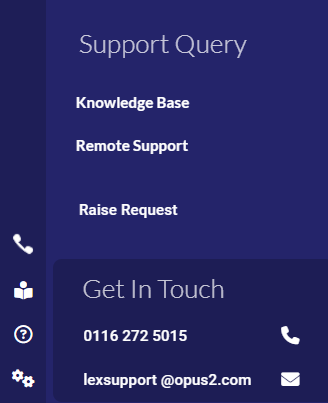
- Contact details for support added to the ‘Support’ menu
Release note category | LEX Product Area | Summary | Release notes |
|---|---|---|---|
Bug fix | Carter RAGFS | Carter print claim popup Additional Court Refs - width too short | Style fix applied. |
Bug fix | Diary | Diary print options end date field misaligned | Style fix applied. |
Bug fix | Columns misaligned with headers in ‘Add Disbursements’ in Verdict | Style fix applied | |
New feature | Fees/Billing | Performance improvements for Appointment Screen Case Predictive | Performance improvements have been made to the case predictive to improve the loading and processing times when searching for, and adding, cases to appointments. |
Bug fix | Workflow Overview showing incorrect currency symbol | Fix applied so that it shows £ symbol rather than the specific currency symbol. | |
Bug fix | New Workflow Forecast performance issues | Performance improvements added to speed up loading of results and processing times when using filters. | |
Bug fix | Other | Charts on some dashboard widgets don't match the values in the table | Fix applied to filters to ensure correct data is returned. |
New feature | Remove # character from file names when uploading to SharePoint | Code applied to LEX and API so that '#' characters will now be replaced with an underscore. | |
Bug fix | Merge Company Issue - Parent Companies | Ability to merge companies into parent companies now locked down to avoid cases being incorrectly moved to parent company. | |
New feature | Start Menu - Support Details | Contact details for support added to the ‘Support’ menu as below:
| |
Bug fix | Reporting | Cases appearing on Close Cases Report in error | Certain RAGFS cases weren’t being included in the overnight processing to recalculate the case fees, which is why they were then incorrectly appearing on the Close Cases report. Fix applied to ensure all RAGFS case are included in this process. The report also now ignores cases with a non-zero amountsDue or amountsDueVat value. |
New feature | Add system option to Payment Summary reporting screen | ‘Cut-Down Payment Summary Style ('PYT IN' EXCEL EXPORT ONLY)’ option now added to Payment Summary report options. |
Was this article helpful?
That’s Great!
Thank you for your feedback
Sorry! We couldn't be helpful
Thank you for your feedback
Feedback sent
We appreciate your effort and will try to fix the article