CF1 - Chambers Configuration, FAQ's and table of rates
FAQ's / Advice from our team
Q - What are the price lists in the schedule based on?
A - At the bottom of this article there is an attachment which covers all of the price list combinations
Q - Can chambers create their own custom price lists on CF1 cases?
A - No
Q - How do I change the rates (e.g. County > High Court) once the fee has been billed. Then ensure the fees reflect the new rates?
A - The feeline needs to be unbilled, then the amendments can be made within the CF1 pop up in the schedule tab
Q - How do I Add / Edit enhancements?
A - This is covered in the main guidance found here CF1 Guidance (New style CF1 only)
Q - What is the difference between uplift as a whole and per fee line?
A - This is covered in the guidance but in short, the enhancements can be added per fee line so out of 5 fee lines, only 1 could include an enhancement. Alternatively if the option is selected to uplift as a whole, the same % and description can be applied to all fee lines for that barrister, saving time entering the same information for each line. When using the whole option, individual fee lines can be amended to be removed from the uplift as required
Additional information
In line with the regulations and advice from the LAA, only CF1 rates appear on the CF1A form. KC, Court of appeal, supreme court, high cost / risk rates DO NOT. All rates will appear on the fee note.
Payment Matching on POA - we recommend you do not match a POA but leave it unmatched as matching the payment will lock down the fee line.
Supreme Court and Court of Appeal matters have no prescribed travel / wait rate by the LAA but LEX uses £40 as the rate for an expert witness. A system option can override this rate and is discussed during the configuration with our team. (SO - Fee Options - Default Travel and Waiting Hourly Rate Options)
It is recommended that chambers use separate payment codes for POA / LAA final payment and IP / Private payments. These can be created if required.
Configuration considerations
The following information is required for the Opus 2 LEX team to configure the CF1 functions:
- Default Price List
- CF1 Hourly rate for Barristers
- Funding type for IP / Private
- Workflow - which workflow should the CF1 cases assign to and should they move to a different workflow when they change to the IP / Private funding
- Default fee note type - Options of Private / Legal aid / Based on funding type. Our recommendation is to always base this on type as the fee note will be produced based on the funding type of the case.
- Claiming Enhancements on POA - should the uplift / enhancements be included in interim / POA claims by default?
- Should enhancements be included in reports by default?
- Reporting Options - should the default for reporting be based on the Private / Legal aid / Based on funding type. Our recommendation is to always base this on type in the same way the fee note production is set to based on funding type.
- New Adjustment code - We recommend a new adjustment / write off code is set up to report on written off CF1 fees separately
Recommended Configuration - more detail
| Set System Defaults for the Schedule - System Option - Case Options - Case Group Options - Set CF1A Case Defaults Why? Fees cannot be added to a case without the schedule being complete. For chambers where a particular combination is 'most common' setting defaults will save the users a significant amount of time NOTE: This does mean users will have to remember to change the defaults if they're unsuitable for the case they're creating. | 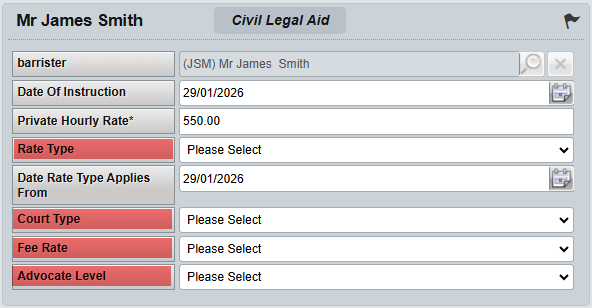 |
| Set Barrister Hourly Rates - Barrister records record an 'Hourly rate' which can be used on all cases. If the requirement is to only use an hourly rate on the CF1 case, a separate box will allow an hourly rate only to be used on those CF1 cases Why? Fees cannot be added to a case without the private rate being set, this is calculated form the Barrister hourly rate. This will populate in to the schedule but can be amended on case level as needed. |
 |
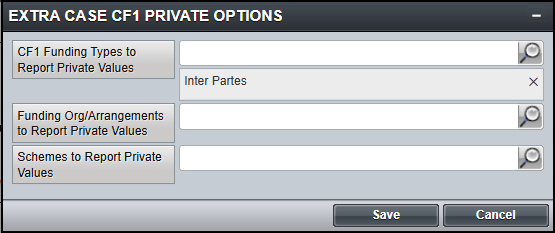
| Configure CF1 Funding Types - Case Options - Case Group Options - Extra Case Funding Type Options Why? Due to the case record calculating both CF1 rates and IP rates, having separate funding as the case progresses allows reporting on the different values NOTE: Chambers will require a CF1 funding type and a separate IP funding type | 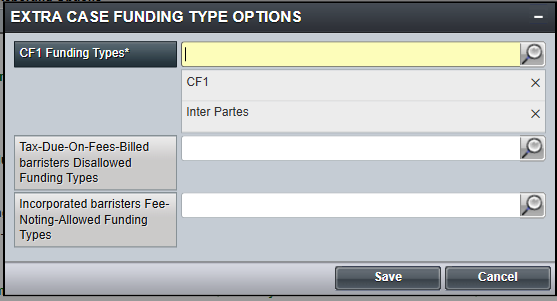 |
 |
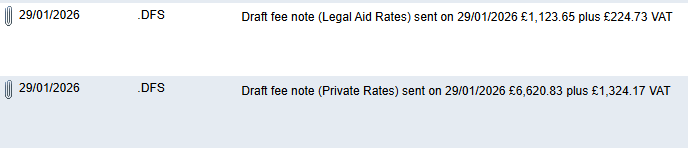
| Enable .DFS - Draft Fee Note Comment Lines - Fee Options - Fee Note Print Options - Add .DFS Comment line for fee notes Why? Enabling this option will result in new .DFS lines being added to the fees page upon the production of each draft fee note. Benefits - Workflow can now trigger based on the production of draft fee note. This means that a case can be left 'unbilled' but still trigger chasing cycle events. This could be helpful if chambers wished to manage CF1 cases flexibly, without the restriction of locking down billed fees. As draft / fee notes can be generated on CF1 cases to include either PRIVATE or LEGAL AID fees, the production of the .DFS line, which includes the PRIVATE or LEGAL AID tag, depending on the rate type selected, helps to keep a record of which type of document was produced. This also helps with the keeping of a chronological list of events on the fees page. NOTE: This will impact ALL cases, not just CF1 if enabled |
 |
Was this article helpful?
That’s Great!
Thank you for your feedback
Sorry! We couldn't be helpful
Thank you for your feedback
Feedback sent
We appreciate your effort and will try to fix the article