XFC - Xero for Chambers
What is XFC?
Xero is a popular, independent, cloud accounting app used by millions of subscribers, including many UK Chambers. Use of Xero for the whole of chambers accounting is not required for LEX's XFC functionality work, but a Xero account and a configured organisation are needed.
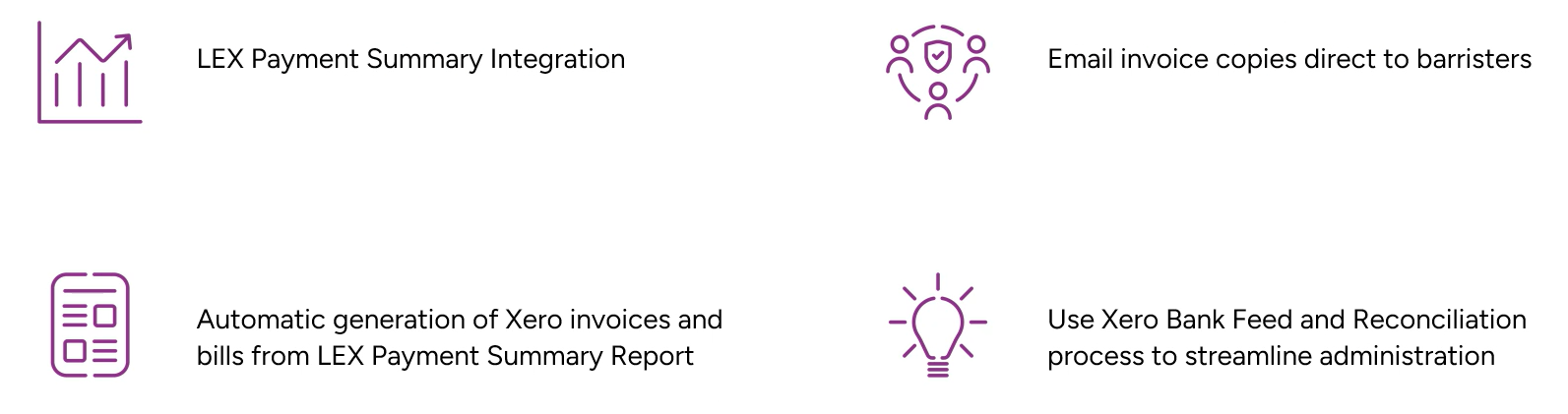
Xero for Chambers (XFC) is the functionality LEX uses to send information to the Xero accounting product, accounting for chambers financial transactions to and from Barristers, such as payments, payment cancellations, chambers rent, commission, recharges and Carter liabilities. Sales / Supplier invoices and credit notes are created within Xero, allowing payments to be made directly to barristers' bank accounts (if configured in Xero)
XFC Process
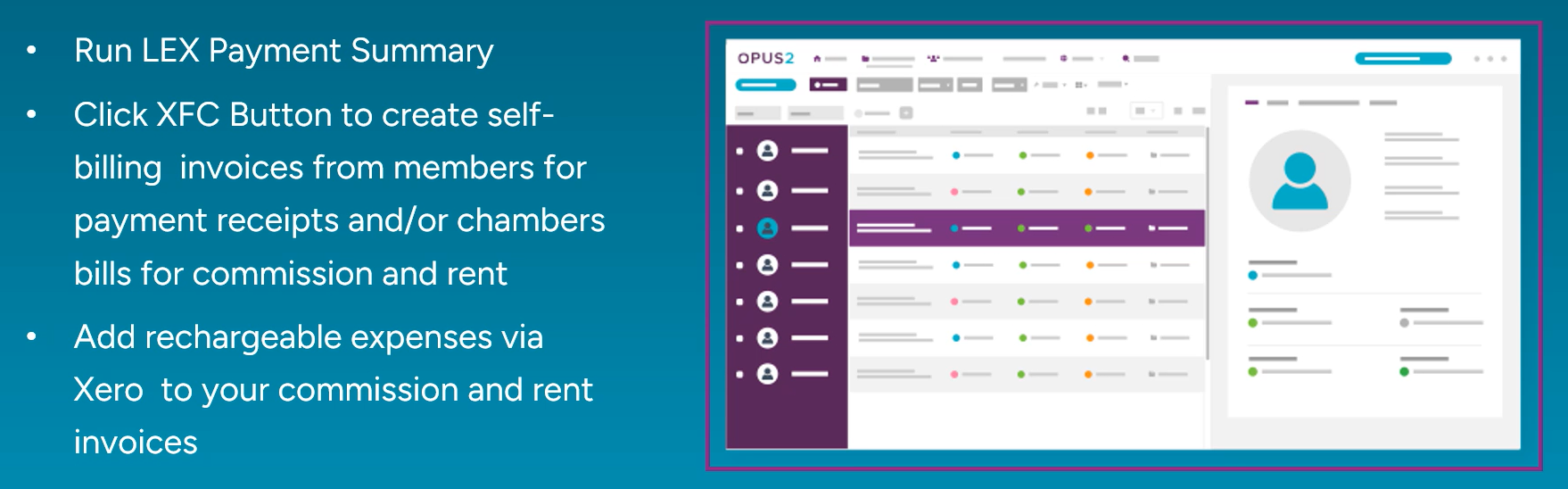
A payment summary report is generated for the required date range and barristers to invoice. Any payments, liabilities, commissions, rent and recharges included in the date range that haven't already been synced to Xero will be available to generate.
There are several types of invoices that XFC can create in Xero:
| Supplier Invoice for a Payment (separately paid by Companies/Solicitors and received by Chambers, owing to a Barrister) | Invoiced to Chambers on behalf of the Barrister. These are grouped onto invoices by Case and Tax Invoice Number. |
| Supplier Credit Note for a Payment Cancellation | Recouped from Barristers to Chambers. |
| Sales Invoice for a Liability | Instructing Advocate (IA) Barrister owes to a Substitute Advocate (SA) Barrister on a RAGFS (Carter) Case. This is counted as Chambers recouping from the IA some of the Payment that they initially received, which has been separately Supplier Invoiced as a normal Payment owing to the SA. |
| Sales Invoice for a fixed monthly Rent | Invoiced to the Barrister. This could include several months’ rent. |
| Sales Invoice for a percentage Commission | Based on a Payment received, invoiced to the Barrister. |
| Sales Invoice for an uploaded Recharge | Based on a Sage CSV export file uploaded to LEX, invoiced to the Barrister. |
| Sales Credit Note for a Commission Refund | Where a Payment has been cancelled and the Commission already paid by the barrister needs crediting back to them. |
| Sales Credit Note for a Liability Refund | Where a Liability has been paid to Chambers by an IA and some of the original Payment’s Commission needs crediting back to the IA. |
| Sales Credit Note for a Recharge Refund | Where a Recharge has been cancelled in Sage, and needs repaying back to the Barrister who paid it. |
- Any Rent, Commission and Recharges owed by a single Barrister are combined onto a single Sales Invoice.
- Any Commission Refund and Recharge Refund owed by a single barrister are combined onto a single Sales Credit Note
- Rent will only be charged once a month per barrister and is always charged at that Barristers Fixed Expense amount, regardless of whether they have any payments on the Payment Summary Report. Multiple months' rent may be payable if the report date range spans more than one month.
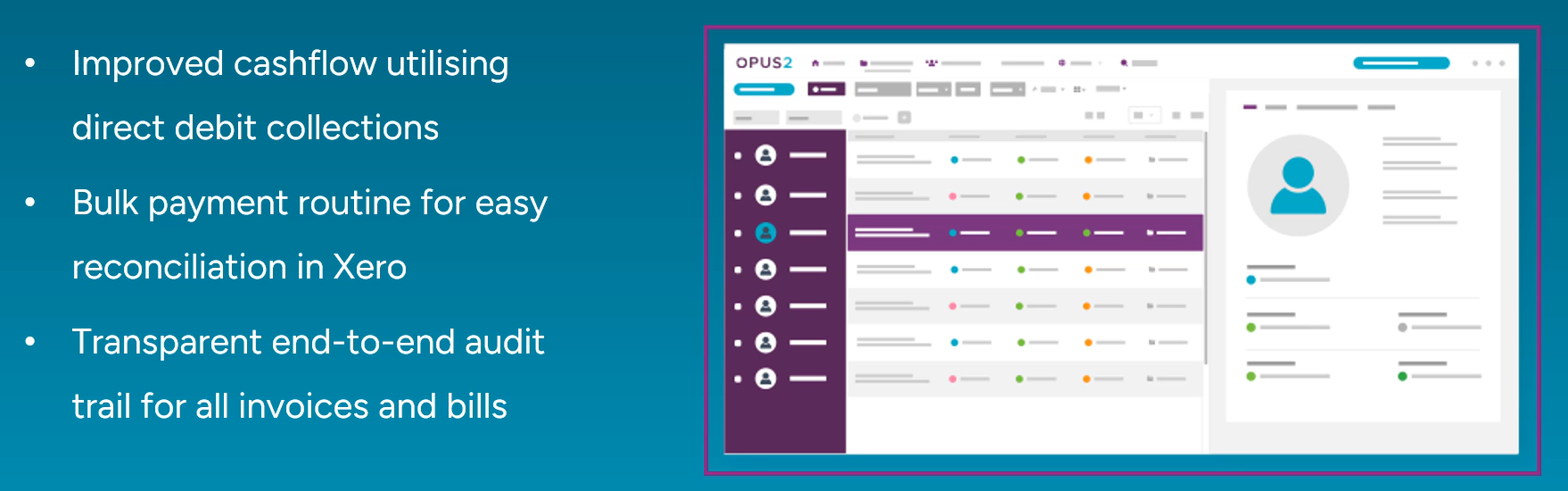
Integration Benefits
XFC Examples
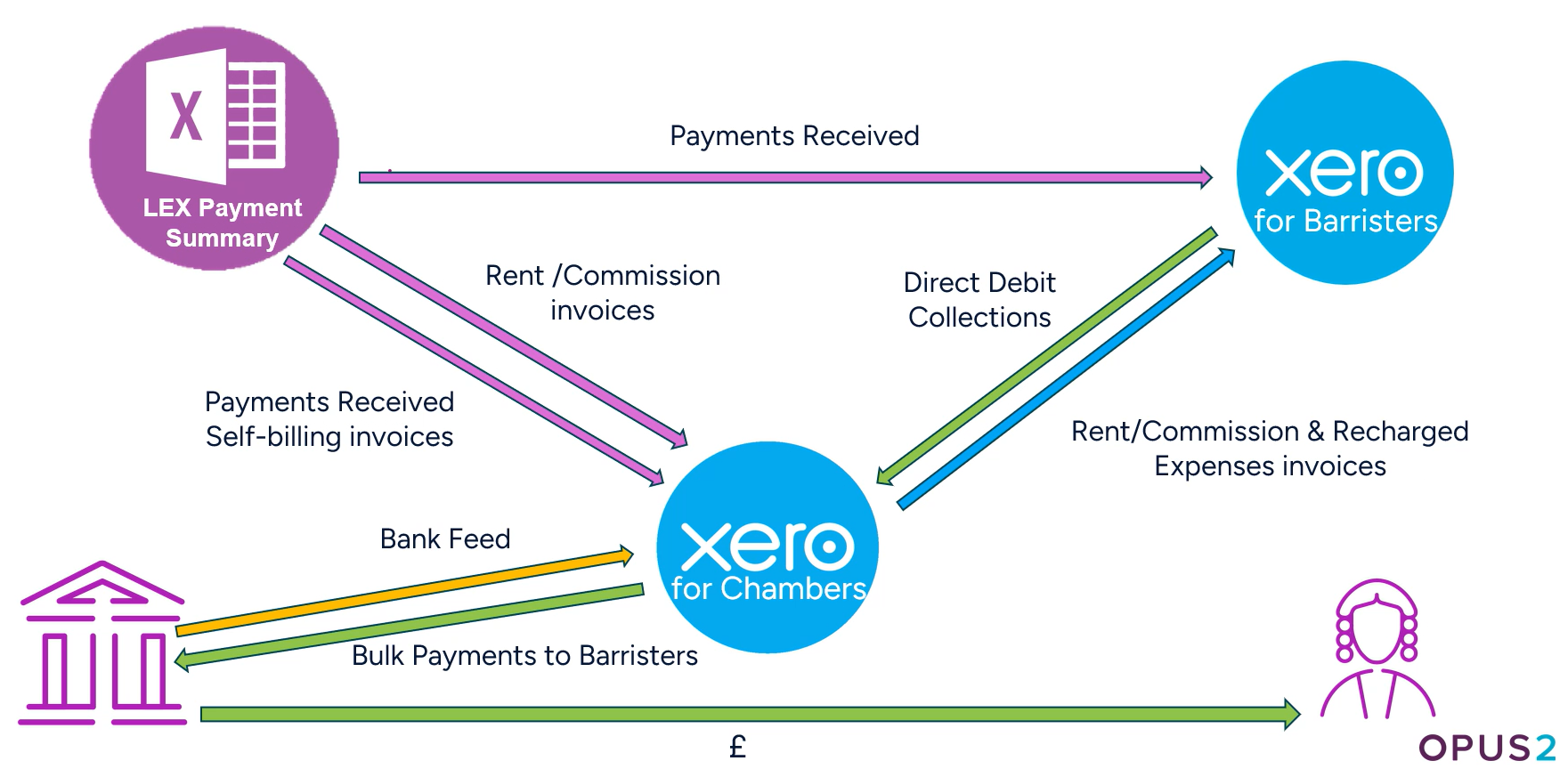
The examples below demonstrate the interaction between LEX and Xero when different types of payments are received. The arrows show the direction of funds: each of the invoices is created in Xero by LEX XFC.
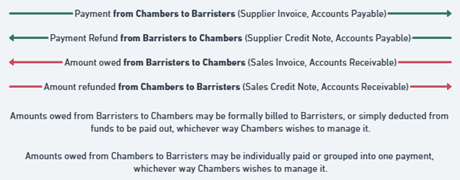
Example 1 - Payment

A £250 payment received from a solicitor is recorded in LEX. This barrister’s Commission is 10%, and Rent is £100/month (not yet paid for this month). After the Payment Summary Report has been run, XFC Invoices are generated:
Step 1 - LEX XFC: a Supplier Invoice, on behalf of the barrister, is created within Xero --->
Step 2 - Xero: a payment of £250 is made from the Chambers bank account to the barrister.
Commission (£25) and Rent (£100) are due:
Step 3 - LEX XFC: a Sales Invoice to the barrister is created within Xero --->
Step 4 - Xero: the barrister is requested to pay £125 (£100 rent and £25 commission) to Chambers.
Note: Any subsequent XFC invoices for this barrister this month will ignore the fixed rent.
Example 2 - Payment Cancellation

A £250 payment received from a solicitor is recorded in LEX. This barrister’s Commission is 10% and Rent £100/month (not yet paid for this month). After the Payment Summary Report has been run, XFC Invoices are generated.
Steps 1-4 for Example 1 above are followed.
Subsequently, the payment is cancelled:
Step 5 - XFC: a Supplier Credit Note, on behalf of the barrister, is created within Xero --->
Step 6 - Xero: the barrister is requested to repay £250 to Chambers.
A Commission Refund (£25) is due:
Step 7 - XFC: a Sales Credit Note to the barrister is created within Xero --->
Step 8 - Xero: a £25 payment is made from the Chambers bank account to the barrister.
Note: Rent is not repaid as that is billed each month at the barrister’s Fixed Expenses rate, regardless of whether they receive any payments.
VAT Treatment
When a VAT Registered Chambers invoices a Barrister for Rent, Commission or Recharges, VAT of 20% must be applied to the (VAT exclusive) amount; even if there is no VAT on the initial related payment or expense, and regardless of whether the Barrister themselves is VAT registered.
The only exception is if a VAT Exempt recharge (such as an overseas expense) has been uploaded into LEX – it remains as VAT Exempt throughout LEX and Xero. It is shown on a separate line on the Generate XFC Invoices pop-up, the Xero invoice and the attached summary document.
Examples
| Rent is £100/month | The Barrister is invoiced for £100 +£20 VAT Rent, regardless of their VAT Registration status |
| Payment at 20% VAT Rate of £200 +£40 VAT is received, and Commission is 10%. | Barrister is paid £200 +£40 VAT, then invoiced for (£200 * 10%) = £20 +£4 VAT Commission. |
| Payment at 20% VAT Rate of £200 +£40 VAT is received, and Commission is 10% | Barrister is paid £200 +£40 VAT, then invoiced for (£200 * 10%) = £20 +£4 VAT Commission. |
| Payment at 0% VAT Rate of £200 +£0 VAT is received, and Commission is 10%. | Barrister is paid £200, then invoiced for (£200 * 10%) = £20 +£0 VAT Commission. |
| Sage Recharge is uploaded for a lunch paid for by Chambers at £10 +£2 VAT | Barrister is invoiced for £10 +£2 VAT |
| Sage Recharge is uploaded for Chambers photocopying of £25 +£0 VAT | Barrister is invoiced for £25 +£5 VAT |
| Sage Recharge is uploaded for a hotel stay in Paris paid for by Chambers at £275 (VAT Exempt) | Barrister is invoiced for £275 |
Sage Recharge Examples

XFC User Guide - Processing Invoices from LEX to Xero
Notes:
Use this guide in full-screen mode for optimal viewing
The guide offers a view and some guidance from within Xero, Opus 2 LEX does not support / train users on the use of Xero, this is to display a more rounded picture of the connection between XFC and Xero. Please refer to Xero.com for complete guidance and support on the Xero side.
Configuration of XFC
For a minimal setup that works with LEX XFC:
- Browse to Xero.com and login, or create a new account.
- Select an existing, or create a new, Xero Organisation to send your XFC invoices to
- Ensure a Bank Account is configured
- Ensure Chambers has the Company VAT Registration number set, if it is VAT registered
Xero pricing plan information in relation to the LEX integration:
- Xero Ignite - Unsuitable - Max 20 invoices per month
- Xero Grow - Suitable
- Xero Comprehensive / Ultimate - Suitable although for the XFC integration, LEX doesn't utilise any of the extra features above Xero Grow
Configuration options within LEX - System Options
Opus 2 LEX will assist in configuration within LEX dependant on the options chambers wish to utilise.
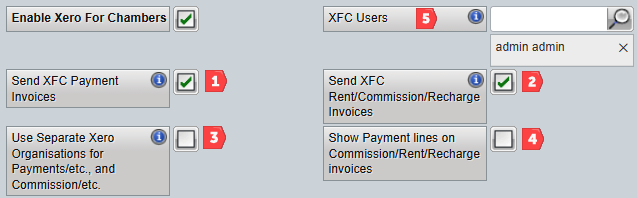
| 1 - Barrister Payments only - Sending Payments / Cancelations / Liabilities invoices to Xero |
| 1 & 2 - Chambers Expenses only - Sending Rent / Commission / Recharges invoices to Xero |
| ?? - Sending BOTH Payments and Chambers to a single organisation in Xero |
| 1, 2 & 3 - Sending Payments and Chambers Expenses to separate organisations in Xero |
| 5 - XFC Users in chambers |
 |
Configuration of Xero
Users are responsible for completing their own training on the Xero product, as Opus 2 LEX does not provide training or support the Xero side of the integration.
During the process of configuring the LEX account to the Xero account, LEX will automatically add LEX specific codes to the Xero nominal codes:
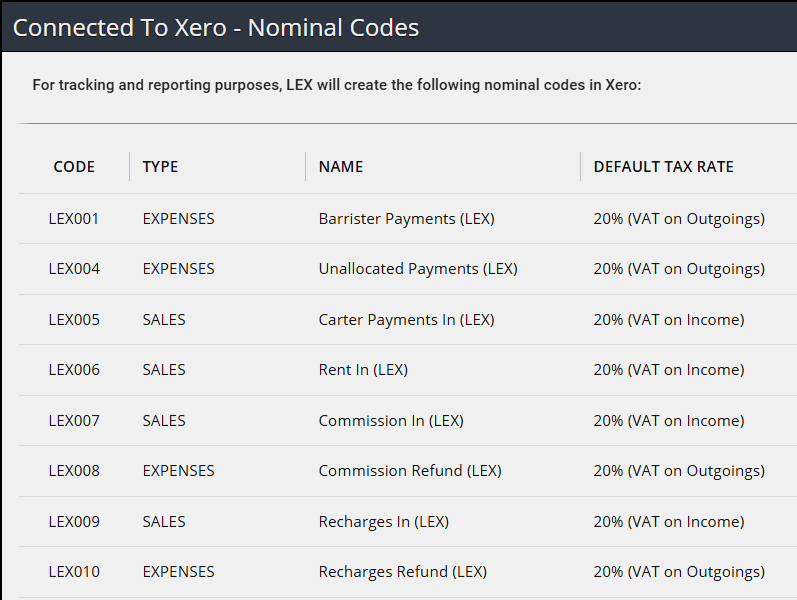
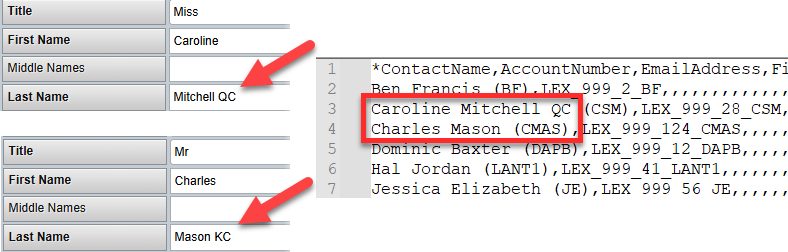
When XFC is processed via LEX for the first time, the Barrister records will be created in Xero at this point. If chambers Xero account already has Barrister records set up, these will match up provided the naming convention is the same in both systems. For example, if a Barrister has KC on the end of their name in LEX but not Xero, this won't match.
The example below shows 2 Barrister records within LEX and an export from the Barrister setup within Xero. Barrister Caroline matches perfectly with the QC on the end of the surname but Charles Mason doesn't have the KC in Xero so LEX will create a new Charles Mason record when XFC syncs for the first time. These can be checked before the first sync takes place to remove the possibility of duplication.
Xero Definitions
Xero – independent accounting software, which Chambers use to manage their accounts.
Supplier – Xero term for an entity who supplies services, such as a Barrister who does work and requires a payment from Chambers.
Customer - Xero term for an entity who is being supplied with services, such as a Barrister who needs to pay rent or commission to Chambers. A barrister will usually be both a Supplier and Customer within Xero.
Expense – Xero's term for an amount outgoing from Chambers, such as a payment to a Barrister. This is not the same as the LEX Fee Code Type of ‘expense’, which refers to travel and accommodation expenses incurred by barristers.
Supplier Invoice/Bill – an Accounts Payable bill that Chambers owes to a Supplier (Barrister), such as a normal payment for work done on a case. XFC groups payments together into Supplier Invoices by LEX Case and LEX Tax Invoice Number.
Supplier Credit Note – an Accounts Payable credit that a Supplier (Barrister) needs to repay back to Chambers, such as a cancelled payment.
Sales – Xero's term for an amount incoming to Chambers.
Sales Invoice – an Accounts Receivable invoice that a Customer (Barrister) owes to Chambers, such as rent, commission or a Carter Liability to be paid to another barrister.
XFC (LEX) Definitions
RAGFS – a Case being billed under the Revised Advocate Graduated Fees Scheme, as laid out by Lord Carter.
IA – Instructed Advocate, a Barrister who receives payments for Carter/RAGFS cases.
SA – Secondary Advocate, a Barrister who also does work for Carter/RAGFS cases. IAs subcontract work to SAs, and therefore owe them payments.
Carter Liability – on a RAGFS case, a liability amount owed by an IA Barrister to an SA for work the SA has done on the IA’s behalf. See below for details of how this works in XFC and Xero.
Payment Cancellation – a payment that has been cancelled within LEX, owed by a Barrister to Chambers.
Commission – an amount, based on a percentage applied to every payment, owed by a Barrister to Chambers. Barristers can have different commission rates from each other, and for different date ranges within LEX.
Commission Refund – a refund of commission, owed by Chambers to a Barrister. Used alongside a payment cancellation or a Carter Liability recouped from an IA.
Rent – a monthly fixed amount, applied to all barristers regardless of the number of payments received. Barristers can have different rent rates from each other, and for different date ranges within LEX. Multiple months’ rent can be billed at once, but each month is only ever billed once.
Payment Summary Report – the report that generates the data that is used to create XFC bills and invoices in Xero.
Was this article helpful?
That’s Great!
Thank you for your feedback
Sorry! We couldn't be helpful
Thank you for your feedback
Feedback sent
We appreciate your effort and will try to fix the article